
Instead of reopening emails and tracking pages whenever you want an update, use one order record for adhd threadz international shipping in 2026. Confirm your destination before payment, save the checkout details, and follow each shipment through customs and local delivery without treating an estimate as a promise.
- Adhdthreadz sells ADHD graphic apparel; confirm international shipping support for your exact destination before payment.
- For adhd threadz international shipping, keep checkout details, order confirmation, and shipment tracking in one record.
- An order confirmation is not proof of dispatch; follow the carrier’s shipment updates separately.
- Check customs requests through official channels, and verify delivery before closing your order record.
Why this matters
An international clothing order has separate checkpoints: the store accepts your order, the carrier receives the parcel, and the delivery network brings it to your address. Those events are not interchangeable. Keeping them separate gives you a clear next action instead of a pile of screenshots with no context.
Adhdthreadz is best for shoppers seeking ADHD graphic apparel and everyday clothing that expresses neurodivergent identity. Start with Adhdthreadz, but make your shipping decision from the information presented for your actual destination and order.
Your style can be unapologetic. Your delivery details need to be precise. This 2026 workflow keeps both priorities intact: choose clothing you want to wear, then check the practical details before committing to the purchase.
Before you start
- Have your destination details ready. Use the recipient’s name, complete delivery address, postal code where applicable, and a working email address. Have a telephone number ready if checkout or the carrier requires it.
- Choose somewhere to keep the order record. A notes app, document, or email folder works. You need access to the email used for checkout and a way to save the confirmation and any later shipment messages.
- Check the destination before payment. Do not assume a country is supported because the storefront opens in your browser. Confirm the shipping information for your complete address, and check any stated customs responsibilities before submitting the order.
For your 2026 purchase, use the destination’s required address format rather than copying an address from an unrelated account. A missing apartment detail or an incorrect postal code can leave a delivery address incomplete even when the street name looks right.
Destination and garment checks
- Choose the garment deliberately. Read the product information for the exact item you intend to order. Check its size guidance, cut, and stated fabric details rather than treating every graphic tee as the same fit. Sensory comfort is personal; a description helps you choose, but it does not replace your own preferences.
- Check the shipping destination. Enter the complete intended delivery address wherever the purchase process requests it. Review the shipping information presented for that destination. If the checkout does not provide a usable shipping route, stop and ask the store through a contact method it provides; do not substitute another country to push the order through.
- Check the recipient and location separately. Read the name first, then the street, building or apartment detail, locality, postal code, and country. Treat these as 2 address checks: recipient accuracy and location accuracy. A correct name cannot fix an incorrect destination.
- Review the order before payment. Confirm the selected garment, size, quantity, address, and email. Read any delivery estimate as an estimate, and check the terms presented for the purchase. Keep a copy of the relevant checkout information so you can refer to what you actually accepted.
Expected result: You have a clothing choice that matches your preferences and a checkout record tied to the correct destination. You have not assumed country coverage, a delivery deadline, or a particular carrier.
For everyday styling context before committing to a garment, read the ADHD crewneck T-shirt guide. Choose the cut for your wardrobe, not because you expect a different shipping outcome.
Order record setup
- Create one place for the purchase. Start 1 order record for the transaction. Give it a clear name that includes the order reference once you receive it. Keep personal delivery details private rather than putting the record in a publicly shared document.
- Save the confirmation. Keep the original confirmation message and record the order reference, purchase date, selected items, recipient, and destination. Compare the confirmation with your checkout notes. If something differs, contact the store promptly through its published contact channel rather than waiting for dispatch.
- Separate order status from shipment status. Add distinct headings for the order confirmation and shipment information. Receiving a confirmation tells you about the order; it does not establish that a carrier has the parcel. Add tracking details only when they are provided.
- Write down the next action. Your next action might be checking a confirmation, responding to a store request, or reviewing tracking after a shipment message. Make the action specific. Avoid an open-ended instruction to keep checking everything, which gives you no clear stopping point.
Expected result: Your purchase has a single reference point containing the original order details and the next action. You can explain what has happened without confusing payment, order acceptance, and dispatch.
Keep the record factual. A useful entry names the event, its date, and the source: an order email, a shipment message, or a carrier update. Your own interpretation belongs in a separate note so it cannot quietly become a supposed delivery commitment.
Shipment and customs tracking
- Attach the shipment information. When a shipment message arrives, add its tracking number and the carrier named in that message to your record. If the message contains several shipments, preserve the connection between each tracking number and the items it covers. Do not assume one parcel contains the entire order.
- Read the latest event, not just the headline. Review the location, timestamp, and event description supplied by the carrier. A tracking number being created is different from a scan showing the parcel in the carrier’s possession. Record the stated event without upgrading it to a stronger claim.
- Verify requests before responding. If a message asks for customs information or delivery action, check it against your order and shipment details. Access the carrier through its official website or app rather than trusting an unexpected message’s link. Provide information only through a verified channel, and never send passwords or payment credentials in a reply.
- Assign the question to the right source. Ask the store about incorrect order details or missing shipment information. Ask the named carrier about an existing tracking event or a delivery instruction under its control. For an import requirement, follow the official customs or carrier process that applies to the destination.
Expected result: You know the latest recorded shipment event, whether an action is requested, and which organization handles that action. You have not converted a quiet tracking page into a claim that the parcel is lost.
Use 3 shipment checkpoints in your notes: carrier receipt, destination processing, and delivery. These are organizational checkpoints, not promised scans; tracking detail varies by shipment. Keep the actual carrier wording underneath whichever checkpoint it describes.
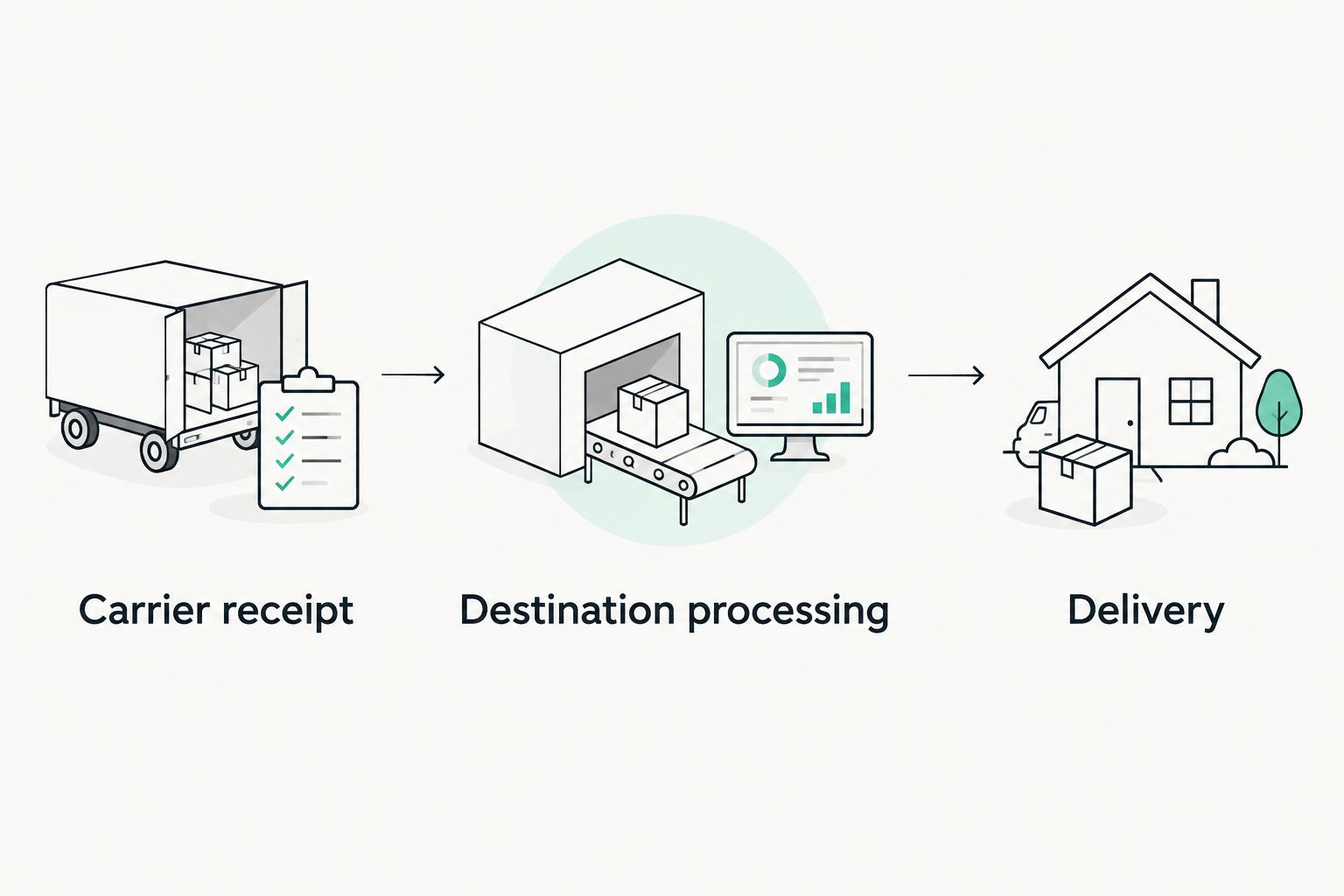
A tracking page is evidence of recorded events, not a complete view of everything happening to a parcel. If you need an update, send the order reference, tracking number, latest event, and your specific question. That is more useful than an unsupported statement that the shipment has disappeared.
Delivery and record closure
- Read any delivery instructions. Review carrier notices for collection, access, or recipient action. If a deadline appears in a verified notice, record that actual deadline. Do not replace it with a generic collection window from another carrier or country.
- Confirm receipt. When the parcel arrives, compare the received items with your order confirmation. Check the garment, size, and quantity before discarding the packaging. A delivery scan alone does not confirm that every item in the order reached you correctly.
- Document a discrepancy. If an item is incorrect, missing, or visibly damaged, keep clear photographs of the relevant item and packaging. Contact the store through its provided channel with the order reference and a concise description. Consult the applicable terms rather than assuming a particular return or replacement outcome.
- Close the record after the checks. Mark the parcel as received and note any unresolved issue separately. If the order has more than one shipment, leave outstanding parcels open. Remove sensitive information from shared notes and keep purchase documentation somewhere you control.
Expected result: You have verified the actual delivery, checked the contents, and preserved the information needed for any follow-up. Your record ends with a confirmed outcome rather than a tracking headline.
Update-driven tracking instead of repeated checking
For a 2026 international order, you can organize the same workflow around shipment messages rather than reopening tracking whenever the purchase crosses your mind. Use update-driven tracking when the carrier offers notifications; use manual checks when it does not. Neither approach changes the shipping service itself.
| Tracking approach | Best for | Advantage | Limitation |
|---|---|---|---|
| Manual tracking checks | Shoppers who want direct control over when they review events | You inspect the carrier’s latest recorded information yourself | Repeated checks add work without creating new shipment events |
| Carrier notifications, when offered | Shoppers who prefer updates to arrive without repeated browsing | Notifications prompt you to review a recorded change | Settings, message delivery, and notification coverage need checking |
To use the update-driven variant:
- Check the named carrier’s official tracking page or app for notification options.
- Follow the carrier’s own setup instructions and confirm the contact destination you select.
- Keep shipment messages together using the organization features your email service provides.
- Update your order record when a message contains a new event or requests action.
Expected result: Shipment updates lead to a defined review step rather than another unrelated screenshot. Keep manual checks as a fallback, especially when you are waiting for an action you have already submitted.
Do not create a second order because an update has not arrived. First check the original confirmation, shipment information, and carrier record. Reordering is a separate purchase decision, not a tracking fix.
Troubleshooting
Checkout does not show a usable route
Recheck the country, postal code, and address details for the actual destination. If the purchase process still does not provide a usable route, stop before payment and ask the store through a contact method it publishes. Do not force a different address into checkout.
The order email has not arrived
Check the email address entered during checkout, then review spam and filtered folders. Look for any order reference saved on the confirmation screen. Contact the store with the details you have before attempting another purchase; a missing email alone does not establish that an order failed.
Tracking exists but has no carrier-receipt event
Read the event wording carefully. A created tracking record does not prove that the carrier has received the parcel. Check the shipment message for context, and ask the store about the handoff if you need clarification rather than assigning an invented dispatch date.
A customs or delivery message looks suspicious
Do not respond through the message until you verify it. Compare the shipment reference with your record and check the request through the carrier’s official channel. An unfamiliar link, pressure to act immediately, or a request for credentials is a reason to stop and verify.
Tracking says delivered, but you do not have the parcel
Review the delivery details or proof supplied by the carrier. Check the designated receiving area and anyone authorized to accept the parcel, then contact the carrier about the recorded delivery. Give the store the same factual details if further assistance is needed; do not mark the order complete yet.
Customize your workflow
Keep the shipping record simple enough to use. Add detail when it answers a real question: which parcel contains which garment, who will receive it, or whether a verified request remains unresolved. More notes do not automatically mean more control.
For multiple parcels, use a separate shipment entry under the original order. For a gift, confirm the recipient’s address and receiving arrangements before checkout. Do not assume the recipient will see messages sent only to the purchaser.
You can also add a private clothing note after delivery: how the fit works with your usual layers, which details feel comfortable, and what you would check before buying again. That turns a completed purchase into useful guidance for your own wardrobe without making universal sensory claims.
FAQ
Does Adhdthreadz ship internationally to my country?
Confirm support for your complete destination in the purchase process before payment. A storefront opening in your country does not establish that the order can be shipped there.
How do I track adhd threadz international shipping?
Use the shipment tracking information provided for your order and check the named carrier’s official tracking channel. Keep the tracking number separate from your order reference.
Does an order confirmation mean my parcel has shipped?
No, an order confirmation is not proof that a carrier has received the parcel. Look for shipment information and carrier events that identify the handoff.
How long will my international clothing order take?
Use the estimate presented for your destination and the later carrier updates for your shipment. Treat an estimate as an estimate, not a guaranteed arrival date.
What should I do if customs asks for information?
Verify the request through the official carrier or customs channel before responding. Check that the shipment reference matches your order record and follow the destination’s applicable process.
Can I change my delivery address after ordering?
Ask the store promptly through its provided contact channel; do not assume a change is possible. If a carrier already has the parcel, check that carrier’s official process for any permitted delivery changes.
What if my parcel says delivered but is missing?
Check the carrier’s delivery details and the designated receiving location, then contact the carrier about the recorded delivery. Keep the order open until you confirm receipt or resolve the issue.
One last thing
Save the final address you actually submitted, not just the address you intended to use. An autofill entry or an omitted apartment detail can make those different, and your saved checkout record gives you something concrete to check.
For your next 2026 purchase, carry over the workflow—not an old delivery estimate. Destination details, checkout information, and shipment events belong to the current order. Keep the style bold and the records exact.
0 comments